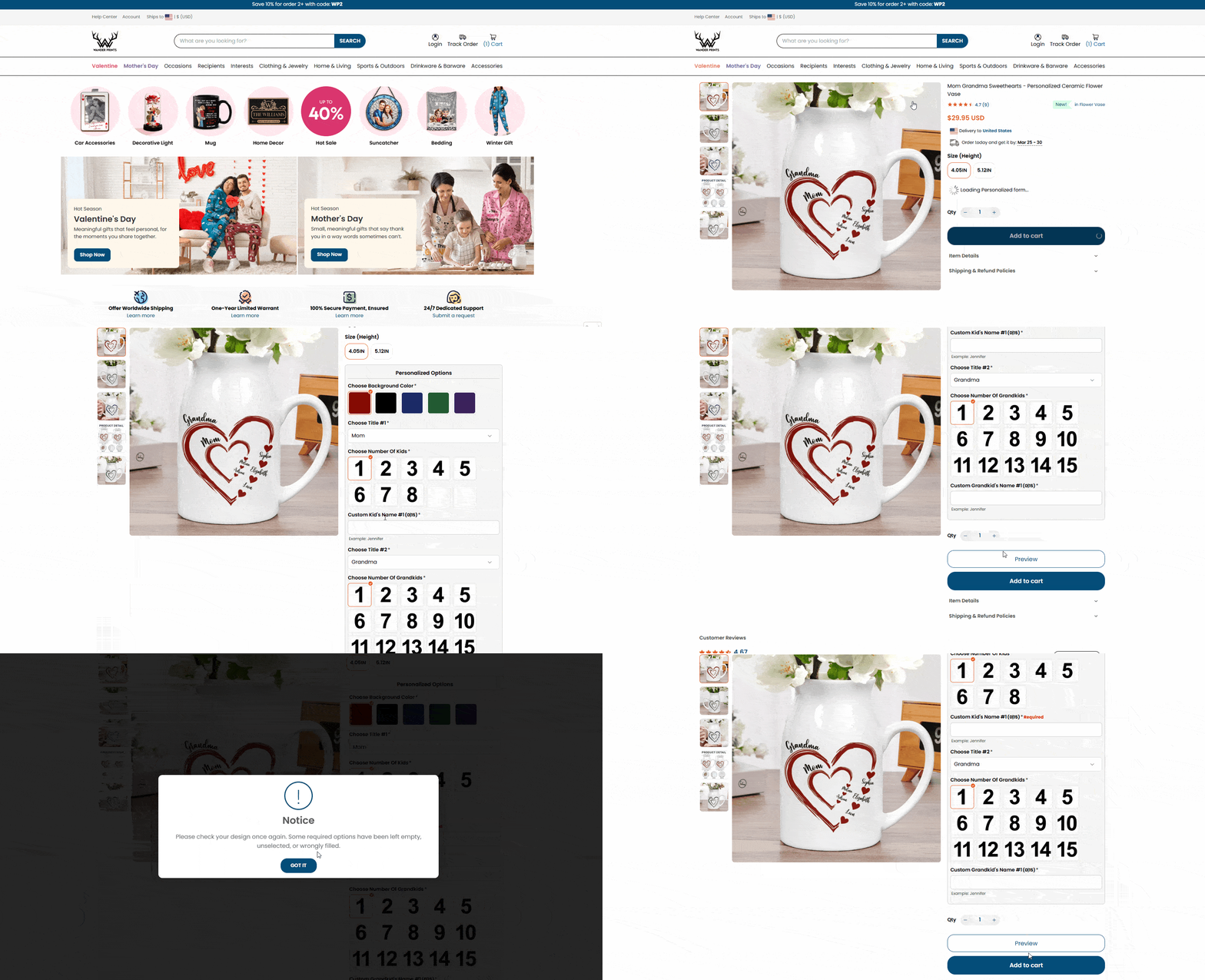
The most common reason for a missing preview is missing required information (names, photo uploads, or options). Please ensure all fields are filled. Other reasons include slow internet, browser cache, or using in-app browsers (Facebook/Instagram). Try refreshing or switching to Chrome/Safari.
1. Common Reasons for Preview Issues
Missing Required Information (Most Common): Our Live Preview tool requires all mandatory fields (names, dates, or photo uploads) to be filled before it can generate the image. Check if you missed any options!
Slow Internet Connection: Generating a personalized preview takes a few seconds. If your signal is weak, the image may show a loading icon or remain blank.
In-App Browsers: If you are visiting from a Facebook, Instagram, or TikTok ad, the built-in browser often blocks the preview script.
Cache Conflicts: Your browser may be storing old data that prevents the new preview from loading correctly.
2. How to Fix It (Step-by-Step)
Check Your Options First:
- Scroll through the product page and ensure every field marked with an asterisk (*) or labeled as required is filled.
- If you are uploading a photo, wait until the upload reaches 100%.
- Once all info is entered, the preview should appear automatically within 3-5 seconds.
Technical Troubleshooting:
On Mobile: Tap the three dots (...) at the top right of your screen and select "Open in System Browser" (Chrome or Safari).
On Desktop: Perform a "Hard Refresh" by pressing Ctrl + Shift + R (Windows) or Cmd + Shift + R (Mac).
3. Is my order still safe to place?
Yes, but please review carefully! Even if the preview window is blank, our system captures the text and photos you entered.
Your Responsibility: Since our system processes orders quickly to ensure fast delivery, please double-check your customization details in the Cart and Order Confirmation email.
Our Policy: We will only reach out to you if the order is completely missing custom information or photos. For all other cases, we will proceed with the details provided by you to avoid production delays.
4. When to Contact Support
If you have filled in all fields and tried a different browser but still can't see the preview:
Take a screenshot of your filled-in options.
Email us at support@wanderprints.com so our technical team can check the design.
Was this article helpful?
That’s Great!
Thank you for your feedback
Sorry! We couldn't be helpful
Thank you for your feedback
Feedback sent
We appreciate your effort and will try to fix the article